Memory Dashboard
The Memory Dashboard is a built-in web interface for browsing, searching, and managing memories without using the CLI. It gives you a real-time visual view of what your agents remember.
Accessing the Dashboard
Open your browser and navigate to:
http://localhost:8230/uiIf the service is running on a remote server, replace localhost with the server IP or hostname. For example:
http://ec2-xx-xx-xx-xx.compute-1.amazonaws.com:8230/uiFeatures
| Feature | Description |
|---|---|
| Agent filter | Filter the memory list by agent ID (e.g. dev, main, blog) |
| Semantic search | Search memories by meaning — results ranked by relevance score (highest first) |
| List view | Browse all memories sorted by created_at descending (newest first) |
| Auto badge | Memories auto-generated by pipelines (auto_digest, auto_dream) are tagged with a green Auto label |
| Short/Long-term badge | Memories with a run_id show an orange 短期 badge; long-term memories (no run_id) show a purple 长期 badge |
| Score display | Search results show a relevance score percentage |
| Expand/Collapse | Click any memory card to expand its full content and metadata |
| Delete | Remove individual memories with the delete button |
UI vs CLI
| Scenario | Recommended |
|---|---|
| Quickly browse what an agent remembers | ✅ Dashboard |
| Search by topic to verify memory quality | ✅ Dashboard |
| Delete a stale or incorrect memory | ✅ Dashboard |
| Add memories programmatically | CLI |
| Bulk operations (list all, filter by run_id) | CLI |
| Automated pipeline integration | CLI |
Interface Overview
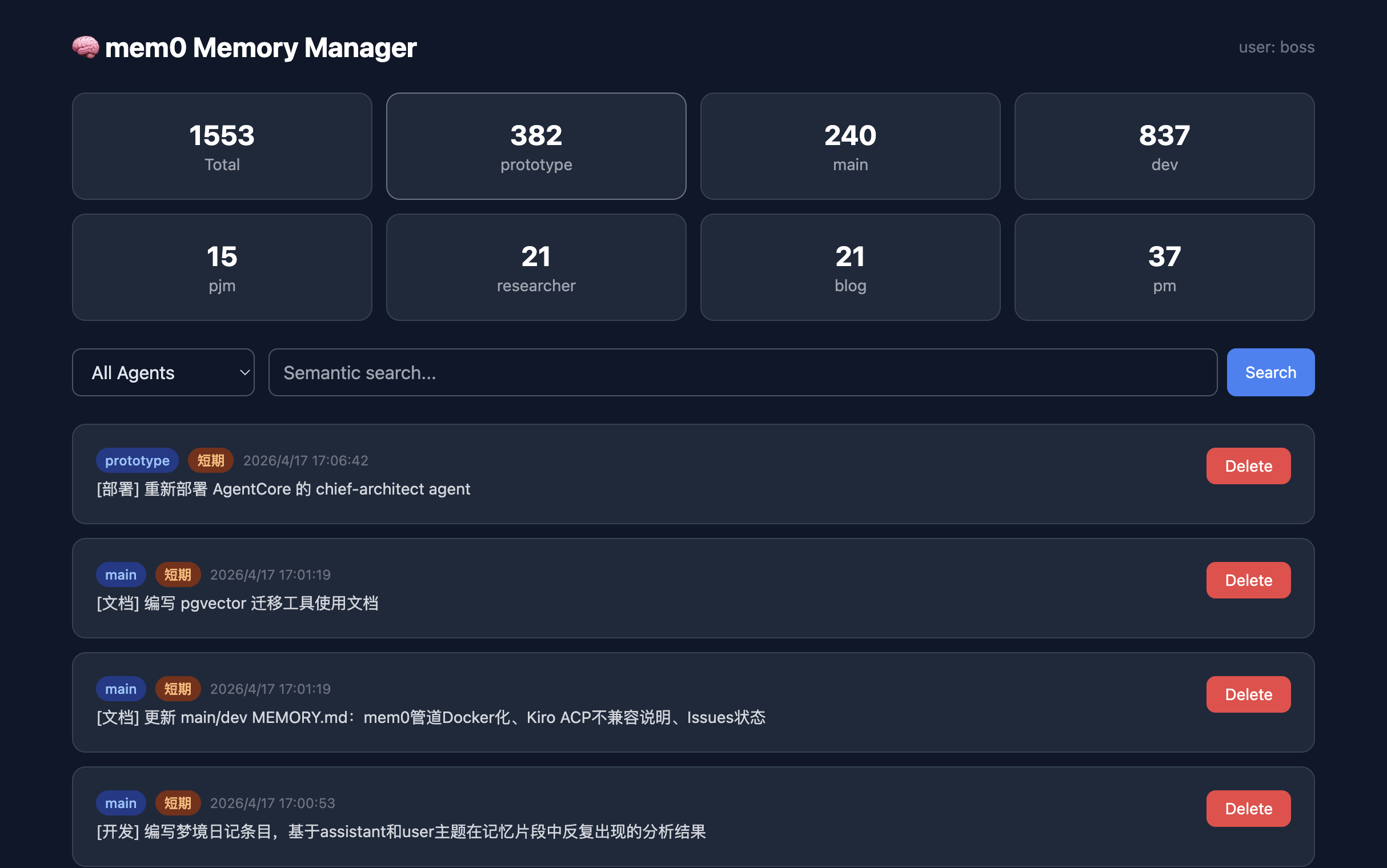
Badge Reference
| Badge | Color | Meaning |
|---|---|---|
| Auto | Green | Memory was written by an automated pipeline (not manually) |
| 短期 | Orange | Short-term memory — has a run_id, will be promoted or archived after 7 days |
| 长期 | Purple | Long-term memory — no run_id, persists indefinitely until explicitly deleted |
| Shared | Blue | Memory from the shared knowledge pool (category=experience or procedural) |